Help
Your enquiries
Every enquiry from your website is emailed to you and saved on your dashboard under Enquiries. Stopping the emails never loses one.
The email
It comes from "Site manager, (your business)" with the subject "(your business): New enquiry from (name)". Tap Reply to answer the customer directly. If they left no email address, the email says so at the top.
Screen to comeThe enquiry email, with Stop sending these to me at the bottom.
Change where they go
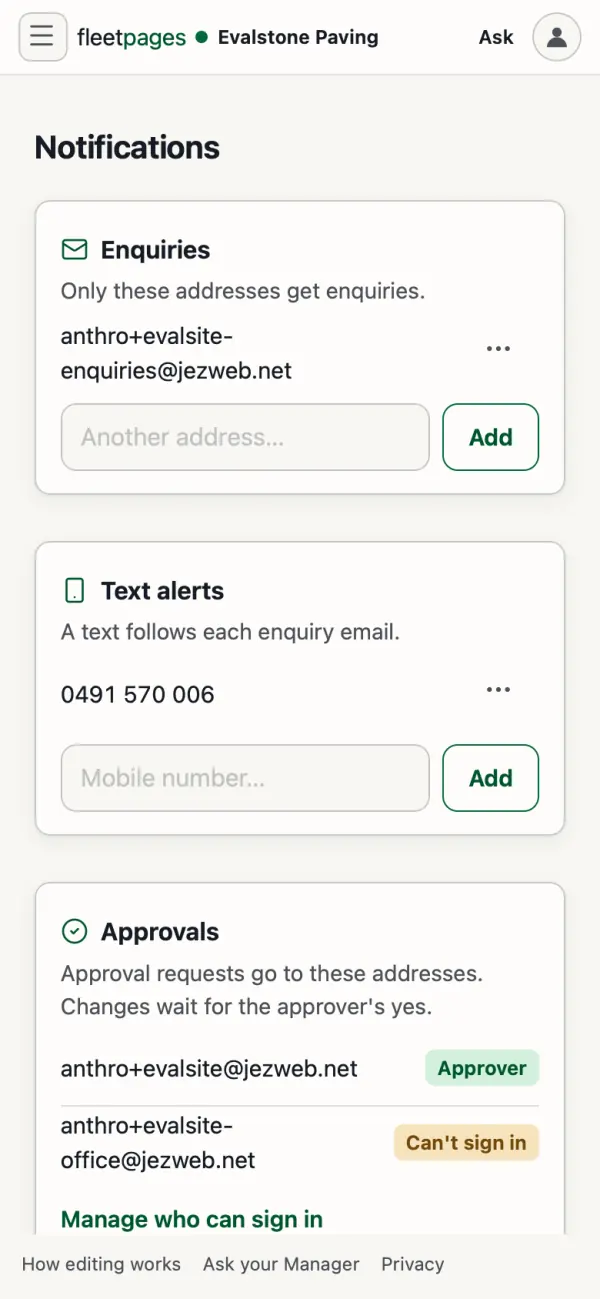
- In the dashboard, open Settings, Notifications.
- Under Enquiries, type an address and tap Add or Use instead. It asks you to confirm first.
Until you add one, enquiries go to everyone listed under Approvals.
Or ask your site manager. It sends you a link, and the change happens when you tap the button there.
"Stop sending these to me"
This link sits at the bottom of every enquiry email. It opens a page that says how many other people still get them, and nothing changes until you tap Stop these emails.
- It stops emails to your address only.
- If you are the last person getting them, the page warns you: new enquiries will then only show on your dashboard.
- Changed your mind? Tap Put me back on on the same page.
Stuck? Ask your site manager, or email hello@fleetpages.au.