Help
Your shop
New orders are emailed to you like an enquiry and wait under Orders on your dashboard. Your site manager changes stock counts and marks orders shipped. Our team changes prices and adds products.
Orders
- Open Your site, Orders. It shows when your site sells online.
- Tap an order. It moves from new to paid, in build, built, shipped and closed, one button at a time. Cancel the order works until it is built.
- Mark as shipped asks for the carrier and tracking number. The buyer gets one email with a tracking link.
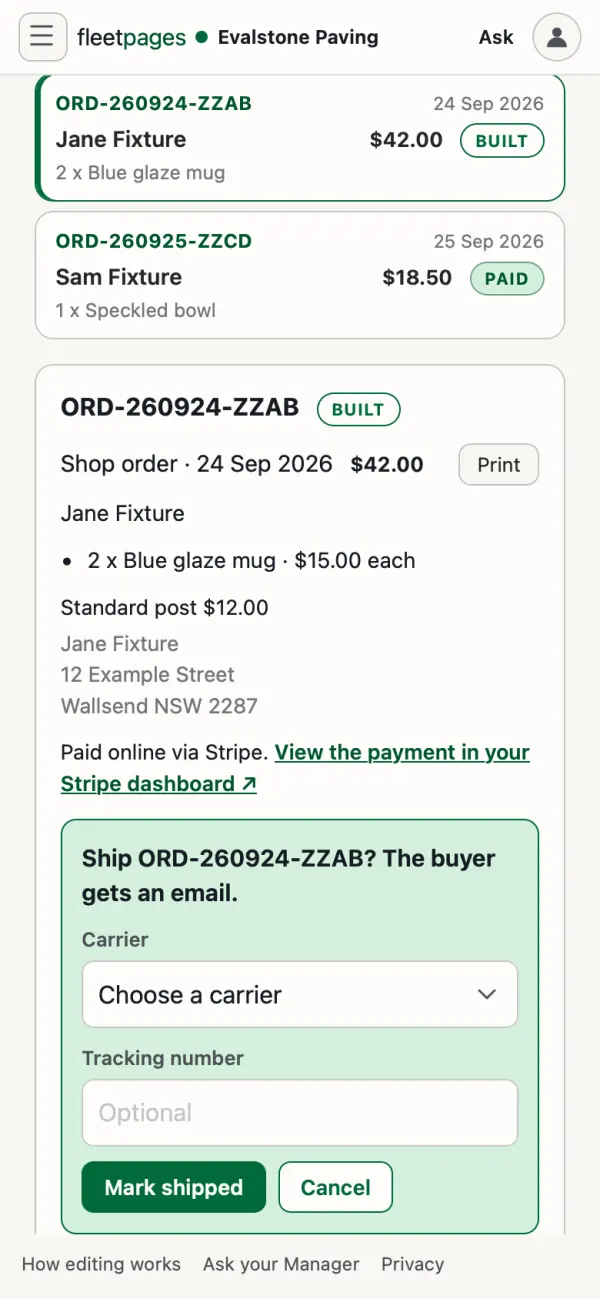
Search by name, email or order number, or tap Download CSV or Print.
Or tell your site manager: "ORD-1042 shipped with Australia Post, tracking 33ABC123".
What your buyer gets
- An email when their payment lands. A tax invoice PDF comes with it once our team sets up your business details.
- A shipped email with the tracking link.
Products
| What you want | Who does it |
|---|---|
| A stock count (0 shows it sold out) | Your site manager, live at checkout straight away |
| Words or photos on a product page | Your site manager, as a preview you approve |
| A price, a new product, colours or sizes, or taking one off sale | Our team, through your site manager |
Shop copied from an older online store? Stock goes through our team too, and old-store edits do not reach your site.
Stuck? Ask your site manager, or email hello@fleetpages.au.